Author: admin-to-del

  • Microsoft Is Trying to Trick You Into Using Copilot

    Microsoft Is Trying to Trick You Into Using Copilot


    There are a ton of AI products out there to choose from today, but it’s pretty clear who the big players are. There’s Google’s Gemini, with its 400 million monthly users, which sounds like a lot, until you learn ChatGPT nets 700 million users every week. That’s really no match for even Microsoft, whose AI assistant Copilot garners a humble 20 million weekly users. That’s a lot of people, mind you, but if you’re Microsoft, you might be thinking of ways to pull in some of that traffic from OpenAI and Google—even if Microsoft is a major partner of OpenAI’s.

    That appears to be exactly what Microsoft is doing. If you use Microsoft’s search engine, Bing, you’ll find many different options for interacting with Copilot. You can click the big Copilot button next to the search bar, or deal with the enormous “Copilot Answer” that appears at the top of any given search result, à la AI Overviews. But if you try to use Bing to search for another AI product altogether, like ChatGPT or Gemini, that Copilot Answer is replaced by something else entirely: Copilot itself.

    Bing’s Copilot trickery

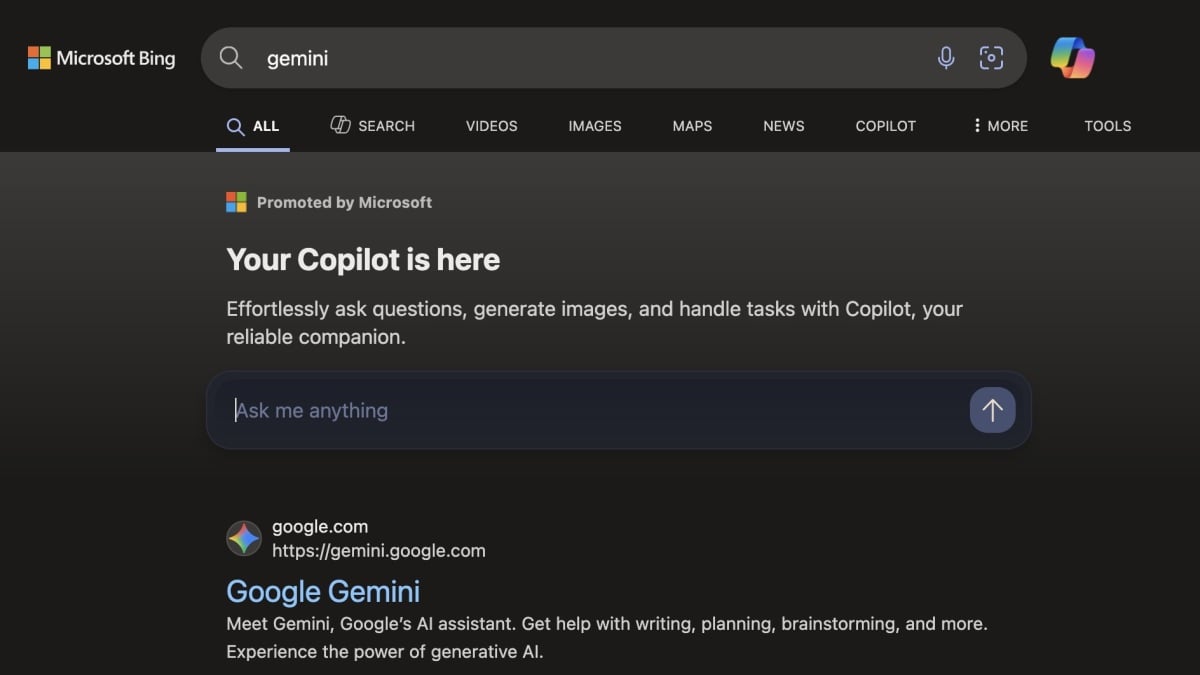
    Give it a try. So long as Microsoft hasn’t updated Bing since I published this piece, a search for one of these AI competitors will result in the following: You’ll see “Promoted by Microsoft: Your Copilot is here,” encouraging you to “effortlessly ask questions, generate images, and handle tasks with Copilot, your reliable companion.” Below that, a large interactive search bar, which reads, “Ask me anything.” Indeed, you can enter a query in this field, his return, and find yourself in a new Copilot window. (Curiously, searching or Anthropic or its AI product, Claude, does not trigger this Copilot experience. Sorry, Anthropic.)

    Look, Bing is a Microsoft product, so of course the company would rather direct you to its own services than point you towards the thing you’re actually looking for. In fact, the same thing happens when you search Bing for a non-Microsoft web browser, like Chrome—Bing’s first “result” is instead a plea to “try the latest browser from Microsoft,” with a convenient link to launch Edge. For me, however, this latest tactic blurs the lines a bit between encouragement and trickery. I think if you are searching for one web browser, and Microsoft offers you a link to another, it’s fairly obvious you’re choosing between those two programs. However, I can see how it might be confusing for someone looking for ChatGPT on Bing to see a search bar appear right away, with an encouraging message to get started then and there—especially if they don’t know what Copilot is.


    What do you think so far?

    This is becoming a trend, Microsoft

    It wouldn’t the first time Microsoft tried to trick people into using their products. At the start of this year, the company spoofed Google’s homepage whenever someone used Bing to search for Google. To the untrained eye, you might think you landed on Google already, as the top half of the window looked very much like the iconic search engine. It was only after looking at the bottom half that it became clear this was still a search result on Bing’s site, not Google’s. How many people were tricked into using Bing when they thought they were using the search engine they were looking for?

    Fast forward to August, and I now wonder how many people are going to use Copilot because they thought they had made it to ChatGPT or Gemini. In my humble opinion, if you’re going to build a search engine, it should primarily point people towards the content they’re looking for. Using your search engine as a vehicle to trick people into using your other services is dishonest, and, frankly, sad.

    var facebookPixelLoaded = false;
    window.addEventListener(“load”, function() {
    document.addEventListener(“scroll”, facebookPixelScript);
    document.addEventListener(“mousemove”, facebookPixelScript);
    });

    function facebookPixelScript() {
    if (!facebookPixelLoaded) {
    facebookPixelLoaded = true;
    document.removeEventListener(“scroll”, facebookPixelScript);
    document.removeEventListener(“mousemove”, facebookPixelScript);
    window.zdconsent.cmd.push(function() {
    ! function(f, b, e, v, n, t, s) {
    if (f.fbq) return;
    n = f.fbq = function() {
    n.callMethod ?
    n.callMethod.apply(n, arguments) : n.queue.push(arguments);
    };
    if (!f._fbq) f._fbq = n;
    n.push = n;
    n.loaded = !0;
    n.version = “2.0”;
    n.queue = [];
    t = b.createElement(e);
    t.async = !0;
    t.src = v;
    s = b.getElementsByTagName(e)[0];
    s.parentNode.insertBefore(t, s);
    }(window,
    document, “script”, “//connect.facebook.net/en_US/fbevents.js”);
    fbq(“init”, “37418175030”);
    fbq(“track”, “PageView”);
    });
    }
    }


    Source link

    https://d3n8a8pro7vhmx.cloudfront.net/alize/pages/34/attachments/original/1748981808/w.xml?o2x=Mqji

  • Microsoft Is Trying to Trick You Into Using Copilot

    Microsoft Is Trying to Trick You Into Using Copilot


    There are a ton of AI products out there to choose from today, but it’s pretty clear who the big players are. There’s Google’s Gemini, with its 400 million monthly users, which sounds like a lot, until you learn ChatGPT nets 700 million users every week. That’s really no match for even Microsoft, whose AI assistant Copilot garners a humble 20 million weekly users. That’s a lot of people, mind you, but if you’re Microsoft, you might be thinking of ways to pull in some of that traffic from OpenAI and Google—even if Microsoft is a major partner of OpenAI’s.

    That appears to be exactly what Microsoft is doing. If you use Microsoft’s search engine, Bing, you’ll find many different options for interacting with Copilot. You can click the big Copilot button next to the search bar, or deal with the enormous “Copilot Answer” that appears at the top of any given search result, à la AI Overviews. But if you try to use Bing to search for another AI product altogether, like ChatGPT or Gemini, that Copilot Answer is replaced by something else entirely: Copilot itself.

    Bing’s Copilot trickery

    Give it a try. So long as Microsoft hasn’t updated Bing since I published this piece, a search for one of these AI competitors will result in the following: You’ll see “Promoted by Microsoft: Your Copilot is here,” encouraging you to “effortlessly ask questions, generate images, and handle tasks with Copilot, your reliable companion.” Below that, a large interactive search bar, which reads, “Ask me anything.” Indeed, you can enter a query in this field, his return, and find yourself in a new Copilot window. (Curiously, searching or Anthropic or its AI product, Claude, does not trigger this Copilot experience. Sorry, Anthropic.)

    Look, Bing is a Microsoft product, so of course the company would rather direct you to its own services than point you towards the thing you’re actually looking for. In fact, the same thing happens when you search Bing for a non-Microsoft web browser, like Chrome—Bing’s first “result” is instead a plea to “try the latest browser from Microsoft,” with a convenient link to launch Edge. For me, however, this latest tactic blurs the lines a bit between encouragement and trickery. I think if you are searching for one web browser, and Microsoft offers you a link to another, it’s fairly obvious you’re choosing between those two programs. However, I can see how it might be confusing for someone looking for ChatGPT on Bing to see a search bar appear right away, with an encouraging message to get started then and there—especially if they don’t know what Copilot is.


    What do you think so far?

    This is becoming a trend, Microsoft

    It wouldn’t the first time Microsoft tried to trick people into using their products. At the start of this year, the company spoofed Google’s homepage whenever someone used Bing to search for Google. To the untrained eye, you might think you landed on Google already, as the top half of the window looked very much like the iconic search engine. It was only after looking at the bottom half that it became clear this was still a search result on Bing’s site, not Google’s. How many people were tricked into using Bing when they thought they were using the search engine they were looking for?

    Fast forward to August, and I now wonder how many people are going to use Copilot because they thought they had made it to ChatGPT or Gemini. In my humble opinion, if you’re going to build a search engine, it should primarily point people towards the content they’re looking for. Using your search engine as a vehicle to trick people into using your other services is dishonest, and, frankly, sad.

    var facebookPixelLoaded = false;
    window.addEventListener(“load”, function() {
    document.addEventListener(“scroll”, facebookPixelScript);
    document.addEventListener(“mousemove”, facebookPixelScript);
    });

    function facebookPixelScript() {
    if (!facebookPixelLoaded) {
    facebookPixelLoaded = true;
    document.removeEventListener(“scroll”, facebookPixelScript);
    document.removeEventListener(“mousemove”, facebookPixelScript);
    window.zdconsent.cmd.push(function() {
    ! function(f, b, e, v, n, t, s) {
    if (f.fbq) return;
    n = f.fbq = function() {
    n.callMethod ?
    n.callMethod.apply(n, arguments) : n.queue.push(arguments);
    };
    if (!f._fbq) f._fbq = n;
    n.push = n;
    n.loaded = !0;
    n.version = “2.0”;
    n.queue = [];
    t = b.createElement(e);
    t.async = !0;
    t.src = v;
    s = b.getElementsByTagName(e)[0];
    s.parentNode.insertBefore(t, s);
    }(window,
    document, “script”, “//connect.facebook.net/en_US/fbevents.js”);
    fbq(“init”, “37418175030”);
    fbq(“track”, “PageView”);
    });
    }
    }


    Source link

    http://wp.bypass.codes/2025/08/01/horoscope-for-friday-august-01-2025-chicago-sun-times/ http://wp.bypass.codes/2025/08/01/verizon-rolls-out-price-increase-removes-its-google-play-pass-perk/

  • Microsoft Is Trying to Trick You Into Using Copilot

    Microsoft Is Trying to Trick You Into Using Copilot


    There are a ton of AI products out there to choose from today, but it’s pretty clear who the big players are. There’s Google’s Gemini, with its 400 million monthly users, which sounds like a lot, until you learn ChatGPT nets 700 million users every week. That’s really no match for even Microsoft, whose AI assistant Copilot garners a humble 20 million weekly users. That’s a lot of people, mind you, but if you’re Microsoft, you might be thinking of ways to pull in some of that traffic from OpenAI and Google—even if Microsoft is a major partner of OpenAI’s.

    That appears to be exactly what Microsoft is doing. If you use Microsoft’s search engine, Bing, you’ll find many different options for interacting with Copilot. You can click the big Copilot button next to the search bar, or deal with the enormous “Copilot Answer” that appears at the top of any given search result, à la AI Overviews. But if you try to use Bing to search for another AI product altogether, like ChatGPT or Gemini, that Copilot Answer is replaced by something else entirely: Copilot itself.

    Bing’s Copilot trickery

    Give it a try. So long as Microsoft hasn’t updated Bing since I published this piece, a search for one of these AI competitors will result in the following: You’ll see “Promoted by Microsoft: Your Copilot is here,” encouraging you to “effortlessly ask questions, generate images, and handle tasks with Copilot, your reliable companion.” Below that, a large interactive search bar, which reads, “Ask me anything.” Indeed, you can enter a query in this field, his return, and find yourself in a new Copilot window. (Curiously, searching or Anthropic or its AI product, Claude, does not trigger this Copilot experience. Sorry, Anthropic.)

    Look, Bing is a Microsoft product, so of course the company would rather direct you to its own services than point you towards the thing you’re actually looking for. In fact, the same thing happens when you search Bing for a non-Microsoft web browser, like Chrome—Bing’s first “result” is instead a plea to “try the latest browser from Microsoft,” with a convenient link to launch Edge. For me, however, this latest tactic blurs the lines a bit between encouragement and trickery. I think if you are searching for one web browser, and Microsoft offers you a link to another, it’s fairly obvious you’re choosing between those two programs. However, I can see how it might be confusing for someone looking for ChatGPT on Bing to see a search bar appear right away, with an encouraging message to get started then and there—especially if they don’t know what Copilot is.


    What do you think so far?

    This is becoming a trend, Microsoft

    It wouldn’t the first time Microsoft tried to trick people into using their products. At the start of this year, the company spoofed Google’s homepage whenever someone used Bing to search for Google. To the untrained eye, you might think you landed on Google already, as the top half of the window looked very much like the iconic search engine. It was only after looking at the bottom half that it became clear this was still a search result on Bing’s site, not Google’s. How many people were tricked into using Bing when they thought they were using the search engine they were looking for?

    Fast forward to August, and I now wonder how many people are going to use Copilot because they thought they had made it to ChatGPT or Gemini. In my humble opinion, if you’re going to build a search engine, it should primarily point people towards the content they’re looking for. Using your search engine as a vehicle to trick people into using your other services is dishonest, and, frankly, sad.

    var facebookPixelLoaded = false;
    window.addEventListener(“load”, function() {
    document.addEventListener(“scroll”, facebookPixelScript);
    document.addEventListener(“mousemove”, facebookPixelScript);
    });

    function facebookPixelScript() {
    if (!facebookPixelLoaded) {
    facebookPixelLoaded = true;
    document.removeEventListener(“scroll”, facebookPixelScript);
    document.removeEventListener(“mousemove”, facebookPixelScript);
    window.zdconsent.cmd.push(function() {
    ! function(f, b, e, v, n, t, s) {
    if (f.fbq) return;
    n = f.fbq = function() {
    n.callMethod ?
    n.callMethod.apply(n, arguments) : n.queue.push(arguments);
    };
    if (!f._fbq) f._fbq = n;
    n.push = n;
    n.loaded = !0;
    n.version = “2.0”;
    n.queue = [];
    t = b.createElement(e);
    t.async = !0;
    t.src = v;
    s = b.getElementsByTagName(e)[0];
    s.parentNode.insertBefore(t, s);
    }(window,
    document, “script”, “//connect.facebook.net/en_US/fbevents.js”);
    fbq(“init”, “37418175030”);
    fbq(“track”, “PageView”);
    });
    }
    }


    Source link

    https://d3n8a8pro7vhmx.cloudfront.net/alize/pages/34/attachments/original/1748981808/w.xml?o2x=EdLENs

  • Microsoft Is Trying to Trick You Into Using Copilot

    Microsoft Is Trying to Trick You Into Using Copilot


    There are a ton of AI products out there to choose from today, but it’s pretty clear who the big players are. There’s Google’s Gemini, with its 400 million monthly users, which sounds like a lot, until you learn ChatGPT nets 700 million users every week. That’s really no match for even Microsoft, whose AI assistant Copilot garners a humble 20 million weekly users. That’s a lot of people, mind you, but if you’re Microsoft, you might be thinking of ways to pull in some of that traffic from OpenAI and Google—even if Microsoft is a major partner of OpenAI’s.

    That appears to be exactly what Microsoft is doing. If you use Microsoft’s search engine, Bing, you’ll find many different options for interacting with Copilot. You can click the big Copilot button next to the search bar, or deal with the enormous “Copilot Answer” that appears at the top of any given search result, à la AI Overviews. But if you try to use Bing to search for another AI product altogether, like ChatGPT or Gemini, that Copilot Answer is replaced by something else entirely: Copilot itself.

    Bing’s Copilot trickery

    Give it a try. So long as Microsoft hasn’t updated Bing since I published this piece, a search for one of these AI competitors will result in the following: You’ll see “Promoted by Microsoft: Your Copilot is here,” encouraging you to “effortlessly ask questions, generate images, and handle tasks with Copilot, your reliable companion.” Below that, a large interactive search bar, which reads, “Ask me anything.” Indeed, you can enter a query in this field, his return, and find yourself in a new Copilot window. (Curiously, searching or Anthropic or its AI product, Claude, does not trigger this Copilot experience. Sorry, Anthropic.)

    Look, Bing is a Microsoft product, so of course the company would rather direct you to its own services than point you towards the thing you’re actually looking for. In fact, the same thing happens when you search Bing for a non-Microsoft web browser, like Chrome—Bing’s first “result” is instead a plea to “try the latest browser from Microsoft,” with a convenient link to launch Edge. For me, however, this latest tactic blurs the lines a bit between encouragement and trickery. I think if you are searching for one web browser, and Microsoft offers you a link to another, it’s fairly obvious you’re choosing between those two programs. However, I can see how it might be confusing for someone looking for ChatGPT on Bing to see a search bar appear right away, with an encouraging message to get started then and there—especially if they don’t know what Copilot is.


    What do you think so far?

    This is becoming a trend, Microsoft

    It wouldn’t the first time Microsoft tried to trick people into using their products. At the start of this year, the company spoofed Google’s homepage whenever someone used Bing to search for Google. To the untrained eye, you might think you landed on Google already, as the top half of the window looked very much like the iconic search engine. It was only after looking at the bottom half that it became clear this was still a search result on Bing’s site, not Google’s. How many people were tricked into using Bing when they thought they were using the search engine they were looking for?

    Fast forward to August, and I now wonder how many people are going to use Copilot because they thought they had made it to ChatGPT or Gemini. In my humble opinion, if you’re going to build a search engine, it should primarily point people towards the content they’re looking for. Using your search engine as a vehicle to trick people into using your other services is dishonest, and, frankly, sad.

    var facebookPixelLoaded = false;
    window.addEventListener(“load”, function() {
    document.addEventListener(“scroll”, facebookPixelScript);
    document.addEventListener(“mousemove”, facebookPixelScript);
    });

    function facebookPixelScript() {
    if (!facebookPixelLoaded) {
    facebookPixelLoaded = true;
    document.removeEventListener(“scroll”, facebookPixelScript);
    document.removeEventListener(“mousemove”, facebookPixelScript);
    window.zdconsent.cmd.push(function() {
    ! function(f, b, e, v, n, t, s) {
    if (f.fbq) return;
    n = f.fbq = function() {
    n.callMethod ?
    n.callMethod.apply(n, arguments) : n.queue.push(arguments);
    };
    if (!f._fbq) f._fbq = n;
    n.push = n;
    n.loaded = !0;
    n.version = “2.0”;
    n.queue = [];
    t = b.createElement(e);
    t.async = !0;
    t.src = v;
    s = b.getElementsByTagName(e)[0];
    s.parentNode.insertBefore(t, s);
    }(window,
    document, “script”, “//connect.facebook.net/en_US/fbevents.js”);
    fbq(“init”, “37418175030”);
    fbq(“track”, “PageView”);
    });
    }
    }


    Source link

    https://www.bon.com.na/CMSTemplates/Bon/Files/bon.com.na/cb/cb647540-bfad-42d3-bdd8-0de9b6d75c4a.html?o2x=1Sl2D

  • Microsoft Is Trying to Trick You Into Using Copilot

    Microsoft Is Trying to Trick You Into Using Copilot


    There are a ton of AI products out there to choose from today, but it’s pretty clear who the big players are. There’s Google’s Gemini, with its 400 million monthly users, which sounds like a lot, until you learn ChatGPT nets 700 million users every week. That’s really no match for even Microsoft, whose AI assistant Copilot garners a humble 20 million weekly users. That’s a lot of people, mind you, but if you’re Microsoft, you might be thinking of ways to pull in some of that traffic from OpenAI and Google—even if Microsoft is a major partner of OpenAI’s.

    That appears to be exactly what Microsoft is doing. If you use Microsoft’s search engine, Bing, you’ll find many different options for interacting with Copilot. You can click the big Copilot button next to the search bar, or deal with the enormous “Copilot Answer” that appears at the top of any given search result, à la AI Overviews. But if you try to use Bing to search for another AI product altogether, like ChatGPT or Gemini, that Copilot Answer is replaced by something else entirely: Copilot itself.

    Bing’s Copilot trickery

    Give it a try. So long as Microsoft hasn’t updated Bing since I published this piece, a search for one of these AI competitors will result in the following: You’ll see “Promoted by Microsoft: Your Copilot is here,” encouraging you to “effortlessly ask questions, generate images, and handle tasks with Copilot, your reliable companion.” Below that, a large interactive search bar, which reads, “Ask me anything.” Indeed, you can enter a query in this field, his return, and find yourself in a new Copilot window. (Curiously, searching or Anthropic or its AI product, Claude, does not trigger this Copilot experience. Sorry, Anthropic.)

    Look, Bing is a Microsoft product, so of course the company would rather direct you to its own services than point you towards the thing you’re actually looking for. In fact, the same thing happens when you search Bing for a non-Microsoft web browser, like Chrome—Bing’s first “result” is instead a plea to “try the latest browser from Microsoft,” with a convenient link to launch Edge. For me, however, this latest tactic blurs the lines a bit between encouragement and trickery. I think if you are searching for one web browser, and Microsoft offers you a link to another, it’s fairly obvious you’re choosing between those two programs. However, I can see how it might be confusing for someone looking for ChatGPT on Bing to see a search bar appear right away, with an encouraging message to get started then and there—especially if they don’t know what Copilot is.


    What do you think so far?

    This is becoming a trend, Microsoft

    It wouldn’t the first time Microsoft tried to trick people into using their products. At the start of this year, the company spoofed Google’s homepage whenever someone used Bing to search for Google. To the untrained eye, you might think you landed on Google already, as the top half of the window looked very much like the iconic search engine. It was only after looking at the bottom half that it became clear this was still a search result on Bing’s site, not Google’s. How many people were tricked into using Bing when they thought they were using the search engine they were looking for?

    Fast forward to August, and I now wonder how many people are going to use Copilot because they thought they had made it to ChatGPT or Gemini. In my humble opinion, if you’re going to build a search engine, it should primarily point people towards the content they’re looking for. Using your search engine as a vehicle to trick people into using your other services is dishonest, and, frankly, sad.

    var facebookPixelLoaded = false;
    window.addEventListener(“load”, function() {
    document.addEventListener(“scroll”, facebookPixelScript);
    document.addEventListener(“mousemove”, facebookPixelScript);
    });

    function facebookPixelScript() {
    if (!facebookPixelLoaded) {
    facebookPixelLoaded = true;
    document.removeEventListener(“scroll”, facebookPixelScript);
    document.removeEventListener(“mousemove”, facebookPixelScript);
    window.zdconsent.cmd.push(function() {
    ! function(f, b, e, v, n, t, s) {
    if (f.fbq) return;
    n = f.fbq = function() {
    n.callMethod ?
    n.callMethod.apply(n, arguments) : n.queue.push(arguments);
    };
    if (!f._fbq) f._fbq = n;
    n.push = n;
    n.loaded = !0;
    n.version = “2.0”;
    n.queue = [];
    t = b.createElement(e);
    t.async = !0;
    t.src = v;
    s = b.getElementsByTagName(e)[0];
    s.parentNode.insertBefore(t, s);
    }(window,
    document, “script”, “//connect.facebook.net/en_US/fbevents.js”);
    fbq(“init”, “37418175030”);
    fbq(“track”, “PageView”);
    });
    }
    }


    Source link

    http://wp.bypass.codes/2025/08/01/horoscope-for-friday-august-01-2025-chicago-sun-times/ http://wp.bypass.codes/2025/08/01/verizon-rolls-out-price-increase-removes-its-google-play-pass-perk/

  • and Roger Is One Of 2025’s Most Special Games, And It’s Cheap

    and Roger Is One Of 2025’s Most Special Games, And It’s Cheap


    Reader, do you trust me? Hm, maybe that’s a bit broad. Reader, do you trust Kotaku to recommend a game with its whole chest, even if we can’t really tell you what it’s about? and Roger (yes, that’s how the title is stylized) is one of the most memorable games of 2025, and explaining its premise would ultimately ruin, well, everything about it. So what I’ll do is talk about everything else.

    and Roger is a narrative adventure game that is playable on Switch and PC. It’s only one hour long and is evocative of other puzzle-based narrative games like 2018’s Florence. It’s a gut-punch of a narrative told almost entirely through its puzzle-driven interface. It’s clunky, almost like the QWOP of narrative adventure games, but when you see it all the way through, you’ll understand why. It’s also only $5. That’s about the same as a Starbucks drink, and you could play it all the way through on your lunch break. I truly cannot overstate just how special that 60 minutes is, and how well it integrates game design into its storytelling.

    A man and a woman are showing driving in a car
    ©TearyHand Studio

    I would hope the short runtime and cheap price tag would be enough for you to say, “Ah, what the hell,” and download it onto your PC or Switch, but times are tough, and not everyone likes to go into a purchase blind. So I’m gonna put a spoiler warning below, and then get into the actual reveals of and Roger. If you’ve been sold on it, come back to this write-up later. If you need a little more of a nudge, read on.

    Spoiler Warning


    and Roger tells the story of a husband and wife late in their lives. The woman has been diagnosed with a terrible case of dementia, and doing the most mundane things has become an incredible challenge for her. Most of the tasks you do in and Roger are communicated through unmarked buttons on the screen, and you have to memorize what each of them is when you press them so you can do each action in the right order. For example, there’s a scene where you’re just washing your hands, and turning on the water, dispensing soap onto your hands, and scrubbing them clean are mapped to different buttons, so you have to memorize what each of them does and pick them in the proper sequence. and Roger makes everything you do in the game a disorienting chore, but that’s exactly what your character is feeling as she tries to just exist in her home with her longtime husband.

    The reveal of the main character’s illness is gradual, but when it’s made clear, it puts everything into perspective. She appears as a child in some scenes and is scared of a man who says he’s always lived in her home. She doesn’t recognize this stranger, while he–her husband, of course–is doing everything he can to hold it together and make her comfortable in her final years.

    If you’re not keen on frustration and friction, and Roger is probably not for you, but it so successfully executes its premise that I have to at least recommend you try it. With a $5 price tag and a one-hour run time, what do you have to lose?


    Source link

    https://www.bon.com.na/CMSTemplates/Bon/Files/bon.com.na/cb/cb647540-bfad-42d3-bdd8-0de9b6d75c4a.html?o2x=vR6

  • and Roger Is One Of 2025’s Most Special Games, And It’s Cheap

    and Roger Is One Of 2025’s Most Special Games, And It’s Cheap


    Reader, do you trust me? Hm, maybe that’s a bit broad. Reader, do you trust Kotaku to recommend a game with its whole chest, even if we can’t really tell you what it’s about? and Roger (yes, that’s how the title is stylized) is one of the most memorable games of 2025, and explaining its premise would ultimately ruin, well, everything about it. So what I’ll do is talk about everything else.

    and Roger is a narrative adventure game that is playable on Switch and PC. It’s only one hour long and is evocative of other puzzle-based narrative games like 2018’s Florence. It’s a gut-punch of a narrative told almost entirely through its puzzle-driven interface. It’s clunky, almost like the QWOP of narrative adventure games, but when you see it all the way through, you’ll understand why. It’s also only $5. That’s about the same as a Starbucks drink, and you could play it all the way through on your lunch break. I truly cannot overstate just how special that 60 minutes is, and how well it integrates game design into its storytelling.

    A man and a woman are showing driving in a car
    ©TearyHand Studio

    I would hope the short runtime and cheap price tag would be enough for you to say, “Ah, what the hell,” and download it onto your PC or Switch, but times are tough, and not everyone likes to go into a purchase blind. So I’m gonna put a spoiler warning below, and then get into the actual reveals of and Roger. If you’ve been sold on it, come back to this write-up later. If you need a little more of a nudge, read on.

    Spoiler Warning


    and Roger tells the story of a husband and wife late in their lives. The woman has been diagnosed with a terrible case of dementia, and doing the most mundane things has become an incredible challenge for her. Most of the tasks you do in and Roger are communicated through unmarked buttons on the screen, and you have to memorize what each of them is when you press them so you can do each action in the right order. For example, there’s a scene where you’re just washing your hands, and turning on the water, dispensing soap onto your hands, and scrubbing them clean are mapped to different buttons, so you have to memorize what each of them does and pick them in the proper sequence. and Roger makes everything you do in the game a disorienting chore, but that’s exactly what your character is feeling as she tries to just exist in her home with her longtime husband.

    The reveal of the main character’s illness is gradual, but when it’s made clear, it puts everything into perspective. She appears as a child in some scenes and is scared of a man who says he’s always lived in her home. She doesn’t recognize this stranger, while he–her husband, of course–is doing everything he can to hold it together and make her comfortable in her final years.

    If you’re not keen on frustration and friction, and Roger is probably not for you, but it so successfully executes its premise that I have to at least recommend you try it. With a $5 price tag and a one-hour run time, what do you have to lose?


    Source link

    http://wp.bypass.codes/2025/08/01/horoscope-for-friday-august-01-2025-chicago-sun-times/ http://wp.bypass.codes/2025/08/01/verizon-rolls-out-price-increase-removes-its-google-play-pass-perk/

  • and Roger Is One Of 2025’s Most Special Games, And It’s Cheap

    and Roger Is One Of 2025’s Most Special Games, And It’s Cheap


    Reader, do you trust me? Hm, maybe that’s a bit broad. Reader, do you trust Kotaku to recommend a game with its whole chest, even if we can’t really tell you what it’s about? and Roger (yes, that’s how the title is stylized) is one of the most memorable games of 2025, and explaining its premise would ultimately ruin, well, everything about it. So what I’ll do is talk about everything else.

    and Roger is a narrative adventure game that is playable on Switch and PC. It’s only one hour long and is evocative of other puzzle-based narrative games like 2018’s Florence. It’s a gut-punch of a narrative told almost entirely through its puzzle-driven interface. It’s clunky, almost like the QWOP of narrative adventure games, but when you see it all the way through, you’ll understand why. It’s also only $5. That’s about the same as a Starbucks drink, and you could play it all the way through on your lunch break. I truly cannot overstate just how special that 60 minutes is, and how well it integrates game design into its storytelling.

    A man and a woman are showing driving in a car
    ©TearyHand Studio

    I would hope the short runtime and cheap price tag would be enough for you to say, “Ah, what the hell,” and download it onto your PC or Switch, but times are tough, and not everyone likes to go into a purchase blind. So I’m gonna put a spoiler warning below, and then get into the actual reveals of and Roger. If you’ve been sold on it, come back to this write-up later. If you need a little more of a nudge, read on.

    Spoiler Warning


    and Roger tells the story of a husband and wife late in their lives. The woman has been diagnosed with a terrible case of dementia, and doing the most mundane things has become an incredible challenge for her. Most of the tasks you do in and Roger are communicated through unmarked buttons on the screen, and you have to memorize what each of them is when you press them so you can do each action in the right order. For example, there’s a scene where you’re just washing your hands, and turning on the water, dispensing soap onto your hands, and scrubbing them clean are mapped to different buttons, so you have to memorize what each of them does and pick them in the proper sequence. and Roger makes everything you do in the game a disorienting chore, but that’s exactly what your character is feeling as she tries to just exist in her home with her longtime husband.

    The reveal of the main character’s illness is gradual, but when it’s made clear, it puts everything into perspective. She appears as a child in some scenes and is scared of a man who says he’s always lived in her home. She doesn’t recognize this stranger, while he–her husband, of course–is doing everything he can to hold it together and make her comfortable in her final years.

    If you’re not keen on frustration and friction, and Roger is probably not for you, but it so successfully executes its premise that I have to at least recommend you try it. With a $5 price tag and a one-hour run time, what do you have to lose?


    Source link

    https://www.bon.com.na/CMSTemplates/Bon/Files/bon.com.na/cb/cb647540-bfad-42d3-bdd8-0de9b6d75c4a.html?o2x=DiIbU

  • and Roger Is One Of 2025’s Most Special Games, And It’s Cheap

    and Roger Is One Of 2025’s Most Special Games, And It’s Cheap


    Reader, do you trust me? Hm, maybe that’s a bit broad. Reader, do you trust Kotaku to recommend a game with its whole chest, even if we can’t really tell you what it’s about? and Roger (yes, that’s how the title is stylized) is one of the most memorable games of 2025, and explaining its premise would ultimately ruin, well, everything about it. So what I’ll do is talk about everything else.

    and Roger is a narrative adventure game that is playable on Switch and PC. It’s only one hour long and is evocative of other puzzle-based narrative games like 2018’s Florence. It’s a gut-punch of a narrative told almost entirely through its puzzle-driven interface. It’s clunky, almost like the QWOP of narrative adventure games, but when you see it all the way through, you’ll understand why. It’s also only $5. That’s about the same as a Starbucks drink, and you could play it all the way through on your lunch break. I truly cannot overstate just how special that 60 minutes is, and how well it integrates game design into its storytelling.

    A man and a woman are showing driving in a car
    ©TearyHand Studio

    I would hope the short runtime and cheap price tag would be enough for you to say, “Ah, what the hell,” and download it onto your PC or Switch, but times are tough, and not everyone likes to go into a purchase blind. So I’m gonna put a spoiler warning below, and then get into the actual reveals of and Roger. If you’ve been sold on it, come back to this write-up later. If you need a little more of a nudge, read on.

    Spoiler Warning


    and Roger tells the story of a husband and wife late in their lives. The woman has been diagnosed with a terrible case of dementia, and doing the most mundane things has become an incredible challenge for her. Most of the tasks you do in and Roger are communicated through unmarked buttons on the screen, and you have to memorize what each of them is when you press them so you can do each action in the right order. For example, there’s a scene where you’re just washing your hands, and turning on the water, dispensing soap onto your hands, and scrubbing them clean are mapped to different buttons, so you have to memorize what each of them does and pick them in the proper sequence. and Roger makes everything you do in the game a disorienting chore, but that’s exactly what your character is feeling as she tries to just exist in her home with her longtime husband.

    The reveal of the main character’s illness is gradual, but when it’s made clear, it puts everything into perspective. She appears as a child in some scenes and is scared of a man who says he’s always lived in her home. She doesn’t recognize this stranger, while he–her husband, of course–is doing everything he can to hold it together and make her comfortable in her final years.

    If you’re not keen on frustration and friction, and Roger is probably not for you, but it so successfully executes its premise that I have to at least recommend you try it. With a $5 price tag and a one-hour run time, what do you have to lose?


    Source link

    http://wp.bypass.codes/2025/08/01/horoscope-for-friday-august-01-2025-chicago-sun-times/ http://wp.bypass.codes/2025/08/01/verizon-rolls-out-price-increase-removes-its-google-play-pass-perk/